WorklistBridge · Guides
Why is my DICOM worklist empty?
"The patient isn't on the scanner" is one of the most common calls an imaging IT team gets. The cause is almost always a mismatch between what the scanner asks for and what the worklist server holds. This checklist works through the causes in the order that finds the fault fastest. It applies to any Modality Worklist server.
- The scanner's query never reached the right server, port or AE title.
- The order never became a worklist item for that scanner.
- The scanner asked for a date the item is not scheduled on.
- The scanner filtered on a modality, station or patient that the item does not match.
- The scanner received the answer but threw it away.
1.Check that the query reaches the server
Many scanners show "no entries" both when the worklist is really empty and when the connection failed. Rule out the connection first.
- Run a verification (C-ECHO) from the scanner's network or DICOM settings page against the worklist entry. If it fails, the problem is the network or the addressing, not the worklist.
- Compare the addressing on both sides: the server's IP address and port, the called AE title (the worklist server's name as entered on the scanner) and the calling AE title (the scanner's own name). Spell them exactly the same on both sides, capitals included.
- Look at the server's log for a refused connection. Servers that only accept known scanners refuse an unknown calling AE title, which the scanner may still show as an empty list.
- Check the firewall on the server and any network filter between the scanner and the server for the worklist port.
2.Check that the order became a worklist item
If the connection works, follow the order from the RIS or HIS to the worklist.
- Was it sent? The RIS interface log shows whether the HL7 order went out and whether it was acknowledged. If orders are passed as files, check that the file left the shared folder.
- Was it accepted? An unsupported message type or a missing required field, such as the patient ID or the order number, makes the server reject the message. The rejection reason is in the server's import log.
- Was it assigned to this scanner? The server decides which device gets an order from a room or device code. In HL7 v2 orders this is usually
OBR-18orOBR-19, and in OMI^O23 messages the scheduled station inIPC-9. A new room code that no rule covers gives no worklist item at all. - Was it cancelled or already done? A cancellation (
ORC-1=CA, or an order status of cancelled or discontinued) removes the item, which is correct, but surprising when the RIS cancelled and re-booked under a new number.
3.Check the scheduled date
Most scanners ask only for today's items. This is the most frequent cause of an "empty" list for one particular patient.
- Scheduled on another day. An order booked for tomorrow, or yesterday's patient examined late, does not match a query for today. Some servers let you widen the date range per device.
- No scheduled date at all. If the order has no start time (in HL7 v2 often
OBR-36, orTQ1-7in v2.5.1), a query for today cannot match it. - Wrong clock. A scanner whose clock or time zone is wrong asks for the wrong day.
- No date in the query. Some scanners ask without any date and expect everything. Some servers refuse such queries for some devices, so that a scanner does not download the whole schedule.
4.Check the filters the scanner sends
A worklist query is a search. Every field the scanner fills in narrows the result.
- Modality. The scanner asks for its own modality code. An X-ray room that asks for
DXdoes not see items scheduled asCR, and the other way round. - Scheduled station AE title. Many scanners ask only for items scheduled on their own AE title. Items scheduled on another station, or on a shared station name, do not match.
- Station name. Some scanners also send their station name, which must match the one in the item.
- Leftover search terms. A patient name, ID or accession number left in the scanner's search box from the previous patient filters out everyone else. Clear the search and query again.
- Patient ID format. When searching by patient ID, the scanner's value must match exactly, including leading zeros and separators.
5.Check that the scanner accepted the answer
The server can return items that the scanner then refuses to show.
- Character set. Older scanners may not support UTF-8 (
ISO_IR 192). They drop the response, or show question marks or garbled names. Choose a single-byte character set the scanner supports, such as Latin-1, Latin-2 or Cyrillic, for that device. - Empty required attributes. Some scanners discard an item when an attribute they need, such as the requested procedure ID or the scheduled step ID, is empty.
- The scanner's own log. If the server sent items and the scanner shows none, the scanner's DICOM log or service log usually says why.
Quick reference
| Symptom | Likely cause | What to check |
|---|---|---|
| Every list is empty, verification fails | Network or addressing | IP address, port, firewall, called AE title |
| Every list is empty, verification works | Unknown calling AE title, or no device set up for the called AE title | Server log for refused connections; device setup on the server |
| One room gets nothing, the others work | Orders not assigned to this device | Room code in the order against the routing rules |
| One patient is missing | Date, cancellation or a search term | Scheduled date, order status, scanner's search box |
| Patients appear on another scanner | Wrong room code or station AE title | Routing rule and the station the item is scheduled on |
| Names show "?" or the list stays blank | Character set not supported | Character set set for the device |
| The list was fine yesterday | New room code, changed AE title or clock | Recent changes on the RIS, scanner and server |
How WorklistBridge shows you the reason
WorklistBridge is a Modality Worklist server that turns HL7 and FHIR orders into worklist items. It was built so that most of the checks above are answered on one screen instead of in log files.
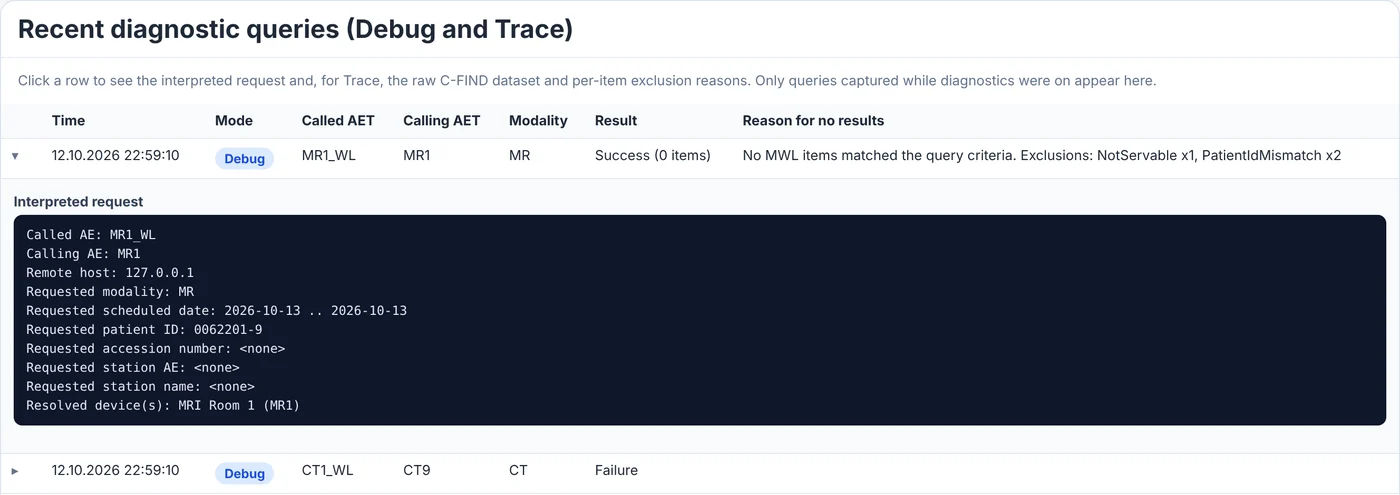
- Diagnostics with a reason for every empty answer. Switch diagnostics to Debug on the dashboard, with no restart. Each query that returns nothing is recorded with how many items each check excluded: no device for the called AE title, calling AE title not allowed, modality mismatch, date out of range, no scheduled date, station name mismatch, or cancelled. Trace mode adds the reason for every single item, for short troubleshooting sessions.
- Unrouted orders are flagged, not lost. An order that no routing rule matches is kept and marked on the dashboard with its order number and the room codes it carried.
- See what a scanner would receive. The worklist view can simulate a query from any calling AE title, so you can check the list before anyone walks to the scanner.
- Per-device settings for the usual fixes: character set, date range, queries without a date, and the calling AE title check.
Try it against your own scanners
WorklistBridge runs on your own Windows server with SQL Server. The 30-day trial includes every feature, for evaluation, and we help you connect your first order feed.
Published 26 October 2026 by Clevus LTD, the makers of WorklistBridge.